
What is Woofer?
Why Woofer
The official Spotify client includes a browser engine and can use a significant amount of memory. Most lightweight alternatives use a terminal interface. Woofer provides a small graphical client instead.
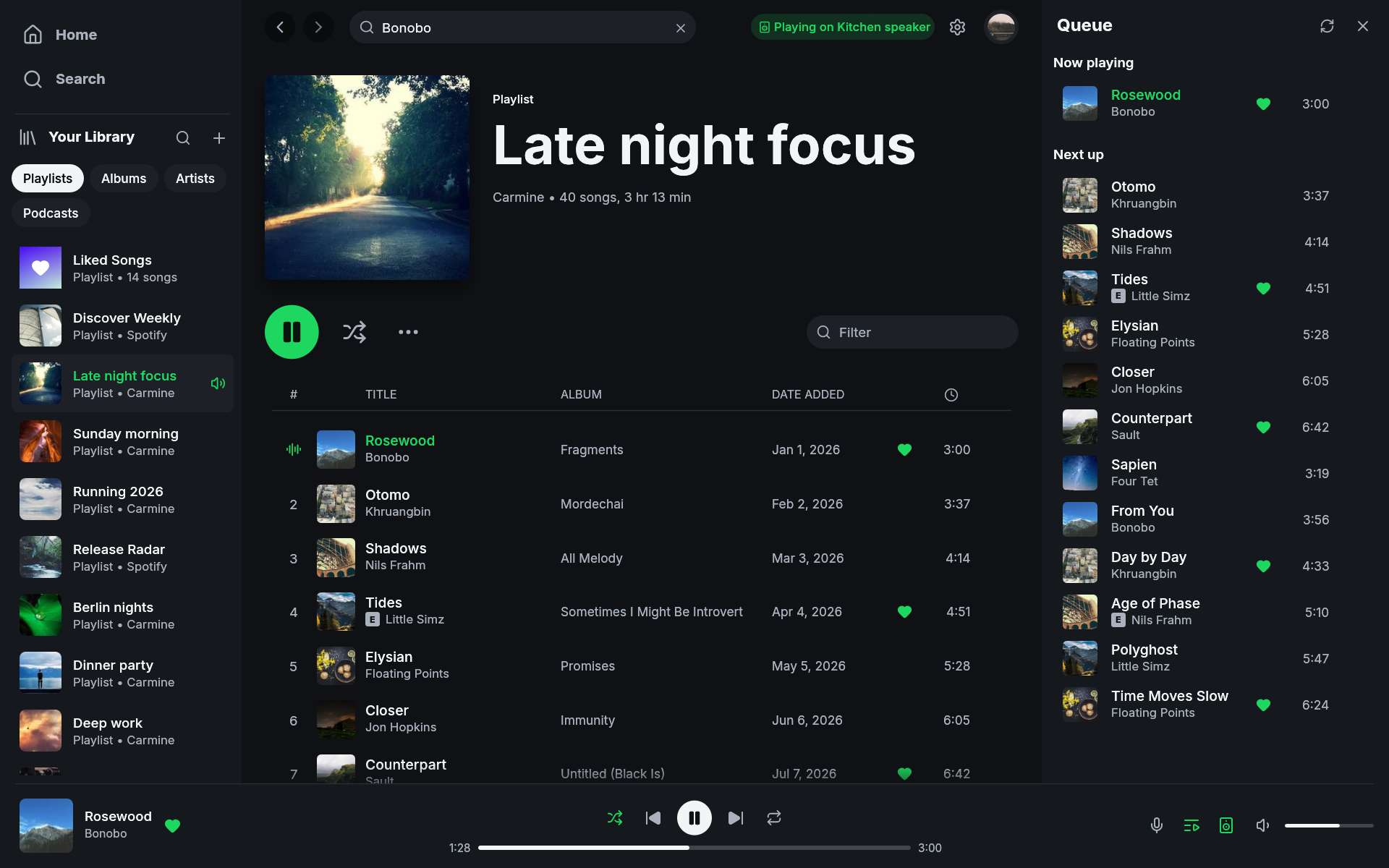
Woofer is a native Spotify client written in Rust with egui, playing music through librespot. It is a single native binary with no embedded browser engine. It starts in well under a second and uses a layout similar to Spotify's desktop client.
What it does
- Plays music on this computer. Woofer is a Spotify Connect device: pick it from your phone, or press play here. Gapless, up to 320 kbps, with optional volume normalisation and an on-disk audio cache.
- Controls other devices. Move playback to a speaker, a phone, or another computer from the device picker, and keep controlling it: play, pause, skip, seek, shuffle, repeat, volume.
- Library access. Playlists, Liked Songs, saved albums, followed artists, podcasts, and saved episodes, filterable in the sidebar and as full pages. Playlists you own can be created, edited, and reordered.
- Search across songs, artists, albums, playlists, podcasts, and episodes, with artist pages, discographies, and related artists.
- Stays out of the way. Closing the window keeps the music playing from the system tray. MPRIS means your media keys, your bar, and
playerctlsee it like any other player. Every common action has a keyboard shortcut. - Looks the part. Pages and the player bar take a tint from the album art of whatever you are looking at or listening to; light and dark themes, or follow the system.
What it does not do
Woofer deliberately has a limited scope:
- Playing needs Spotify Premium, on this computer (as with every librespot-based client) and on other devices too, because Spotify's API only takes playback commands from Premium accounts. Browsing and search work on any account, and Woofer says so when a Free account signs in.
- Initial setup has two sign-ins because Spotify grants Web API and streaming access separately. How it connects explains why.
- Local playback tops out at 320 kbps. Spotify protects its lossless streams with DRM that librespot does not support, and Woofer will not circumvent it. This can change if lawful support lands upstream.
- No video podcasts or social features.
- Playlist rows can be reordered by dragging or from their context menu; the rest of the sidebar can be arranged the same way.
- Woofer is an unofficial client built on Spotify's public Web API and librespot. Spotify changes these from time to time; when they do, features can break until the client catches up.
If something misbehaves, an issue should include the output of woofer -v, what happened, and what you expected.
Account safety
We are not aware of a Spotify account being suspended for using Woofer or another librespot player with Premium. Sign-in happens on Spotify's own pages, audio uses the quality included with Premium, DRM stays intact, and Woofer does not rip tracks or block ads.
Reported suspensions usually involve modded apps that remove ads from free accounts, track ripping, or stream manipulation. Woofer does none of those things, and its contribution rules prohibit them.
Prior art
Woofer uses librespot for Spotify playback. spotify-tui, spotify-player, and ncspot demonstrated the scope possible in a small client. Omarchy Spotify provided an example of a full graphical Spotify client for Linux.
Woofer is an independent project, not affiliated with or endorsed by Spotify AB. Spotify is a trademark of Spotify AB.